Select and assign
Review incoming stories, decide what to use and assign the work to the right people.
- Date-based assignment inbox
- Select, hold and drop decisions
Newsroom automation software
Bring reporter submissions, CMS review, bulletin production and live contribution into your newsroom workflow, with applications for playout, prompting, graphics and administration.
Run the newsroom around your own server and local network. Add Newsroom Live for browser-based contribution and producer-managed conversations.
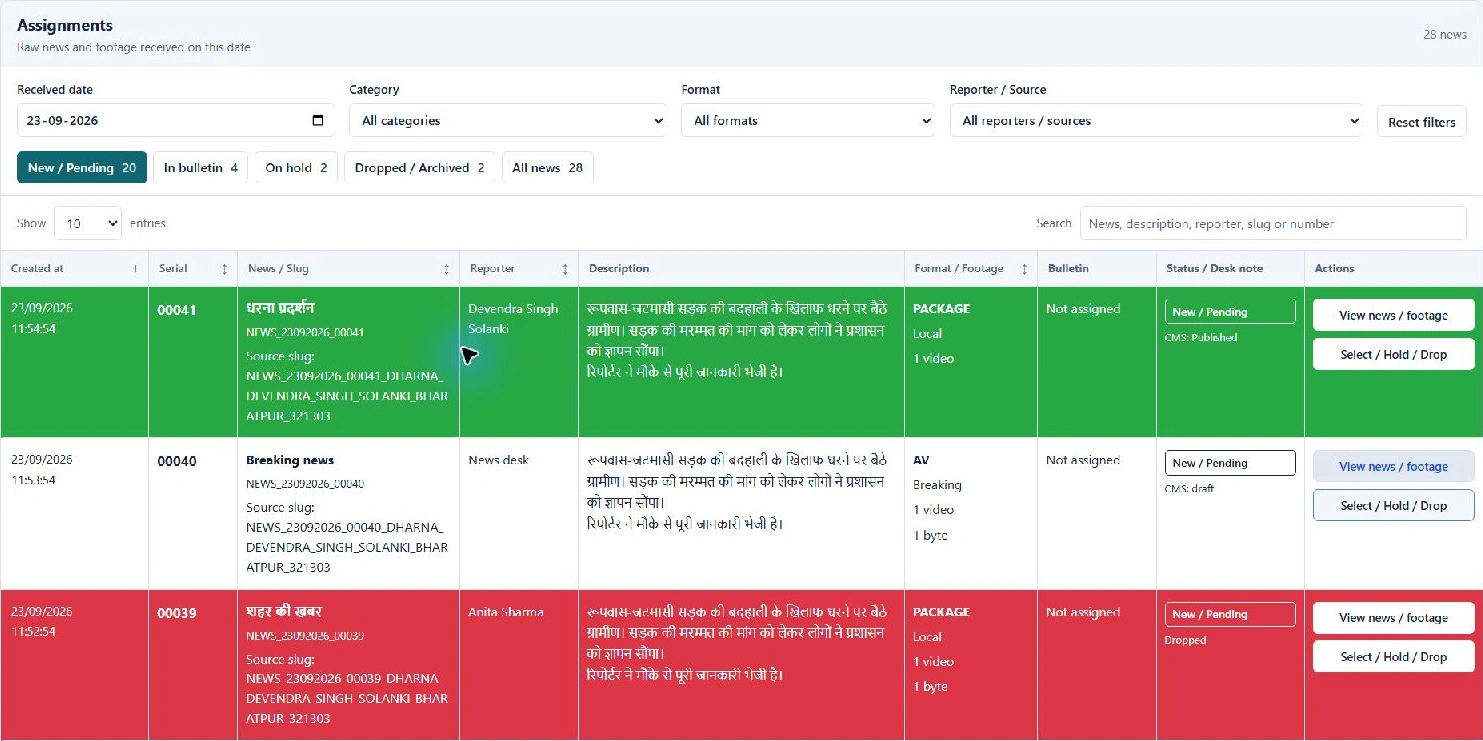
The assignment interface, shown with sample news. Explore the application views below.
A look inside
Screenshots from local demonstrations of the product interface. Sample stories, a local video clip and presenter copy are used to show the workflow.
Review incoming news by date, category and source. The captured assignment component uses sample stories and shows the selection controls.
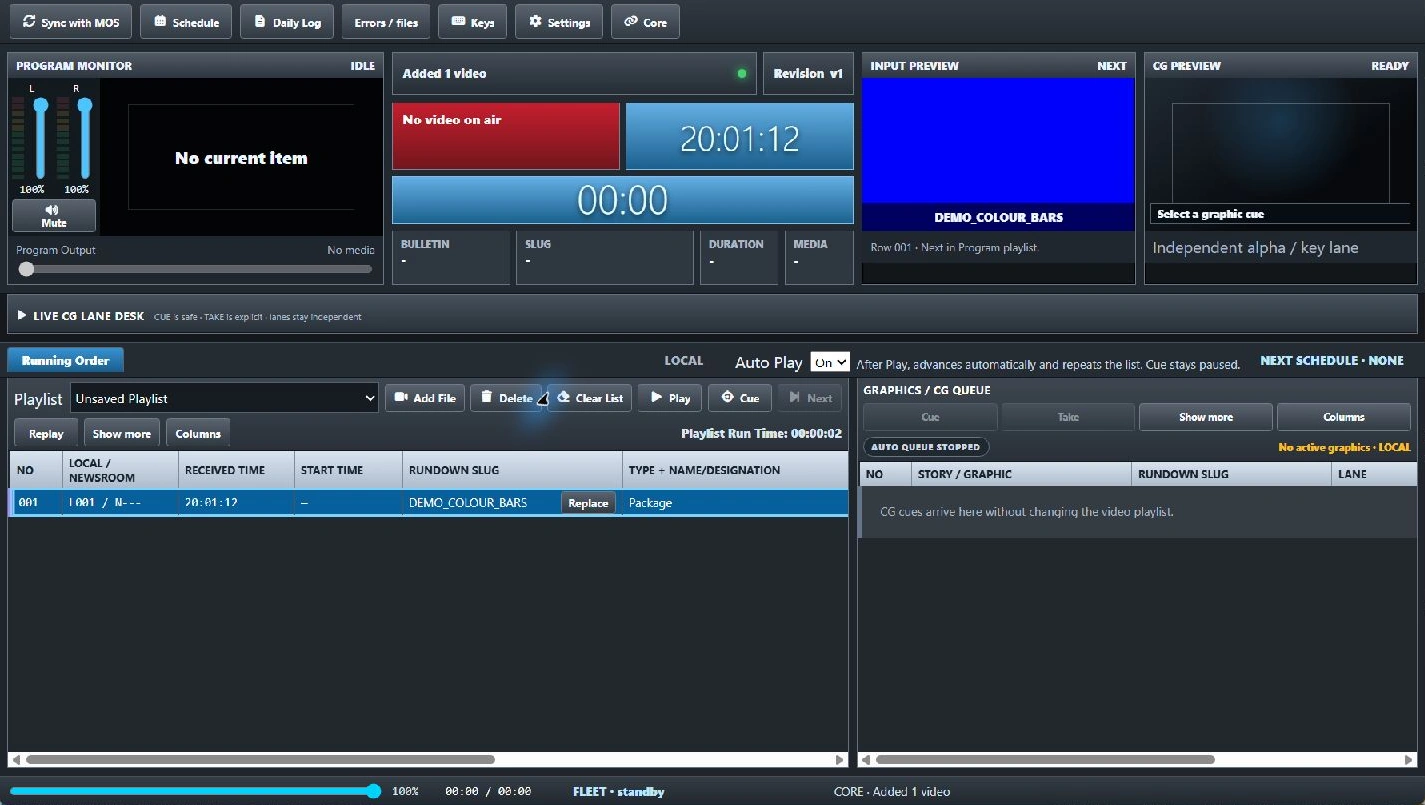
The local demo shows a queued sample clip, the input preview, running order and graphics queue. External broadcast outputs are disconnected.
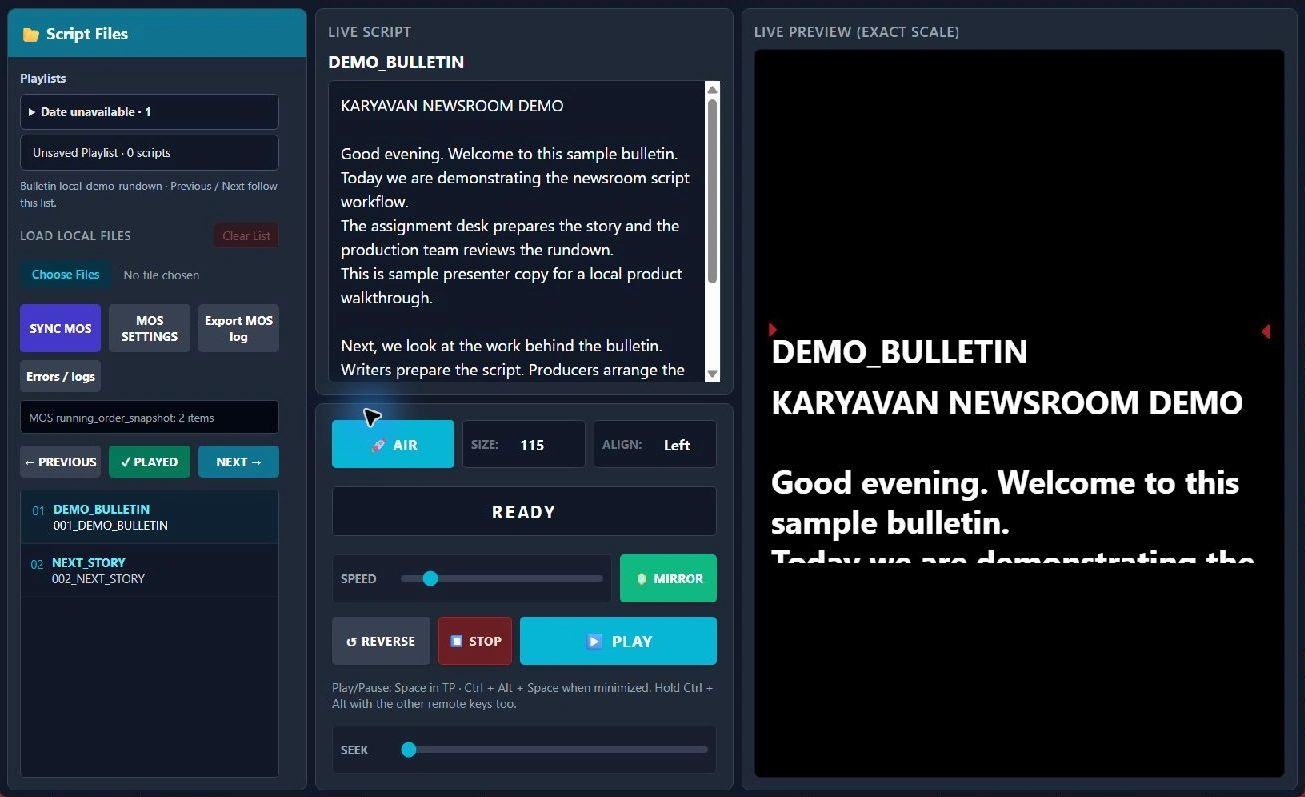
The local demo has a sample bulletin loaded, with script text, story navigation, presenter preview and prompting controls.
These local views show the working interface. Request a walkthrough of the current build and your intended newsroom workflow.
01 / The workflow
From the assignment desk to production, each stage has a place in the workflow.
Review incoming stories, decide what to use and assign the work to the right people.
Write the script, prepare graphics text and attach the final media parts for the bulletin.
Order the rundown, review timing and progress, and let the producer approve the prepared item.
Send approved content to the configured applications and follow the device delivery status.
Reporting & content intake
The reporter app submits story details and media to the CMS. The desk reviews the material before the configured newsroom feed brings it into Operator.
Story details, footage and bytes
Receive, review and prepare the handoff
Select, assign and build the rundown
Prepared scripts, media and graphics
Field reporting
Reporters can prepare a submission on their phone, attach the material and follow the upload from the app.
Browser-based editorial desk
The CMS receives reporter submissions and keeps the stories, attached media and editorial decisions available to the desk.
The CMS is the content intake and editorial desk. Core Admin manages newsroom access, application health and delivery monitoring. Reporter and CMS integration can be included in the setup; stories can also be created directly in Operator.
Actual Android screens from a local demo using Karyavan branding and sample stories. The interface below shows the reporter's Home and Create views.
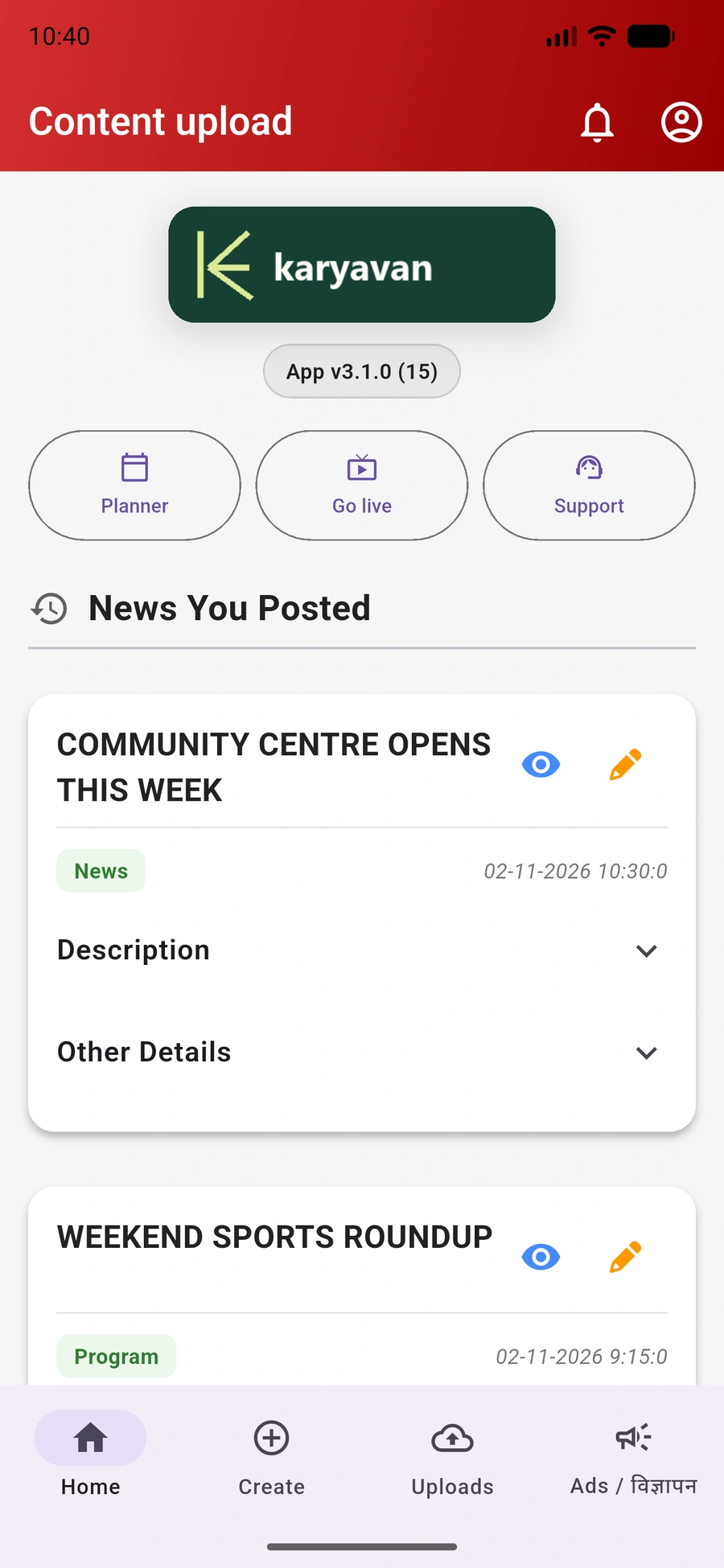
The Home view brings the reporter's stories, details and day-to-day shortcuts together. The entries shown here are sample content.
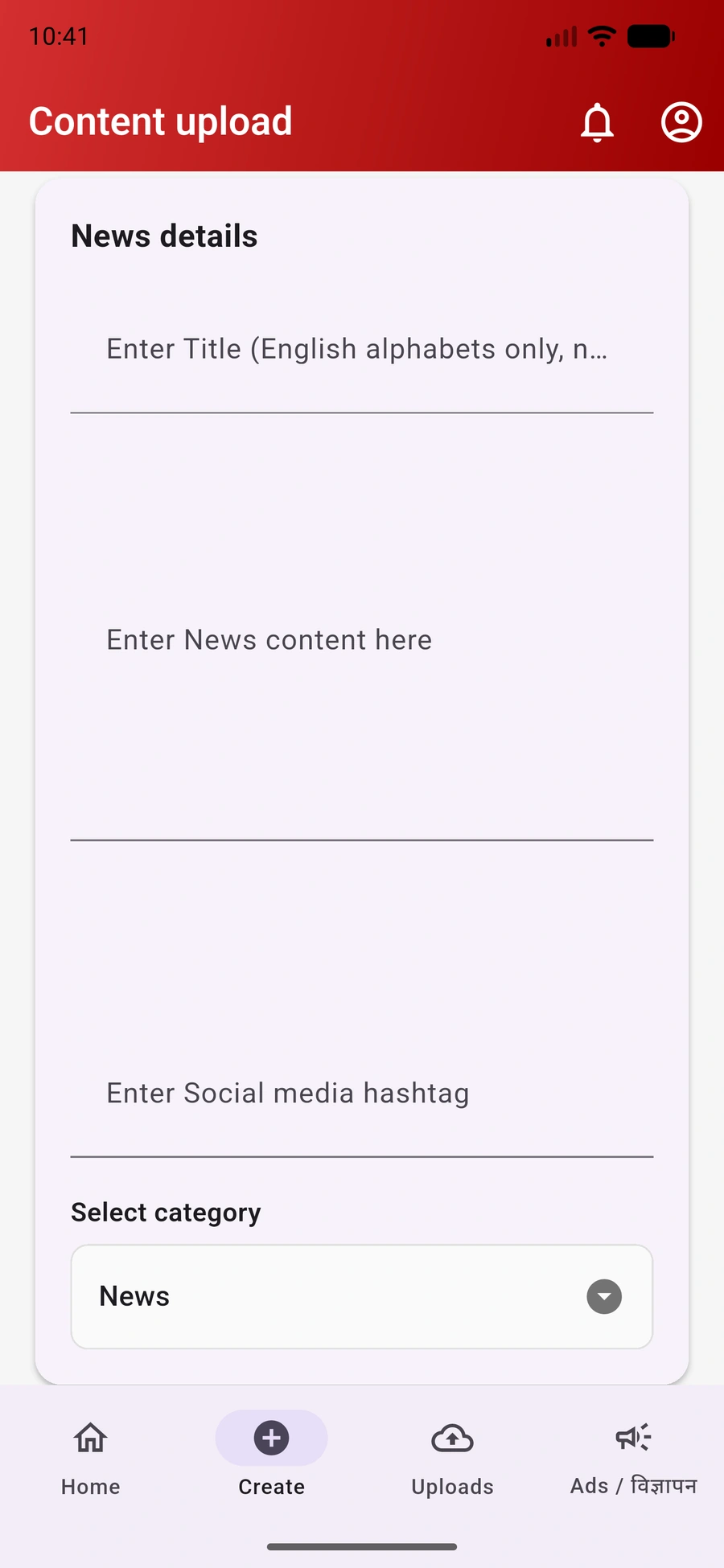
The Create view starts with the title, news copy, hashtags and category. Footage and byte attachments continue further down the submission workflow.
02 / The applications
Choose the application scope around your newsroom. Each part has a defined role in the work.
Editorial & rundown
The desktop workspace for assignments, story preparation and bulletin rundowns.
Program & graphics output
A standalone workstation for local playlists, newsroom bulletins and graphics output.
Presenter workflow
A script workspace with a separate presenter display and newsroom delivery options.
Graphics preparation
Build reusable graphics templates with editable fields and timing controls.
Browser administration
Manage access and review newsroom activity, workstations and delivery information.
Optional browser module
Bring reporters, presenters and guests into browser rooms with producer admission controls.
Story intake and shared services
The Core connects newsroom data and application workflows. Stories can be entered in Operator or brought in through a configured CMS feed. Reporter and CMS integration can be included in the agreed setup.
The newsroom workflow includes targeted rundown and script delivery to configured Playout and Teleprompter workstations. MOS connections to third-party broadcast and graphics systems, including Vizrt, can be scoped for your environment.
We review the target product, version and workflow before confirming compatibility. Additional connectors, workflow changes and integrations can be developed on request.
Live contribution
Newsroom Live provides browser rooms for reporters, presenters and guests, with producer controls and separate participant outputs. It is an optional module hosted as part of the agreed newsroom setup.
Guests check their camera and microphone, enter their name and wait for admission. The room brings admitted participants into a shared gallery.
The producer manages admission, muting and removal. Participants control their own microphone when unmuting is permitted.
Separate output links keep each assigned participant available to the configured production workflow, with their own video and audio.
Go Live in the Reporter app
The app checks the reporter's CMS permission and opens the live destination configured for that account. The link can launch the browser or streaming application used in the agreed workflow.
Newsroom Live provides the browser rooms and producer controls. The reporter link, guest access and production outputs are set up for the chosen workflow.
See the local network setupLocal-first deployment
Host the CMS, Core and supporting services on a server inside your newsroom. Connect desks and workstations over your wired LAN or office Wi-Fi.
Content intake, newsroom data and shared application services.
Workstations use the server and media sources available on your local network. Reporter apps are configured for the chosen CMS server as part of deployment.
For participants on-site, Newsroom Live can be configured to keep call media and individual outputs on the LAN. The setup includes the media service, trusted HTTPS and the required network routes.
Off-site guests, remote feeds and external services need the appropriate internet connection. We confirm the operating requirements for live access, licensing and connected services during setup.
03 / Deployment & integration
We look at your users, systems, media sources and production process before agreeing the installation and network setup.
Discuss your setupEditorial roles, bulletins, workstations and how the team moves a story through production.
The tools, media sources and broadcast systems that the proposed workflow needs to work with.
Application scope, integration requirements, deployment, testing and support responsibilities.
Before a demo
Karyavan Newsroom Automation is a product family for reporter submissions, CMS review, assignments, rundowns, playout, teleprompting and graphics. Optional Newsroom Live adds browser-based contribution rooms. The application scope, integrations and local network deployment are agreed for each newsroom.
Request a walkthrough and tell us about your newsroom. We can discuss the relevant applications, current product scope and your requirements.
Reporters submit story details and media through the app. The CMS receives the material for desk review and the assignment handoff. A configured adapter brings the appropriate stories into Operator. We agree the media paths, editorial decisions and any changes needed for your organisation.
The app checks the account's Go Live permission with the CMS. An authorised reporter can then open the configured live destination. Newsroom Live rooms and any streaming-tool connection are arranged for the intended contribution workflow.
Yes, the product supports an in-house server and LAN-based setup for CMS, Core and newsroom workstations. Newsroom Live can also be configured for on-site participants, with its media service and trusted HTTPS. Off-site contribution and external services need suitable internet connectivity. The exact offline scope and any licensing requirements are confirmed for your installation.
The video team can use its editing tools and attach the exported package, byte or voice-over parts as final media. The rundown keeps those parts with the story for the production handoff.
We can assess a MOS or vendor-specific connection for the exact tool and version you use. The required connector, workflow and testing are scoped for your installation. Other broadcast tools and custom integrations can also be discussed on request.
We can discuss the changes your team needs. Customisation is scoped against the product's current architecture and the intended workflow.
The product scope, licensing, deployment and support arrangements are confirmed as part of the commercial discussion.
Let's look at your newsroom
We can start with the workflow you use today and the part you want to improve.